Skip to content

Parameters

Complete reference for all LOESS configuration options.

Quick Reference

Language-specific values

Null value — R: NULL · Python: None · Rust: None · Julia: nothing · Node.js/WASM: null · C++: NAN (floats), 0 (integers), {} (vectors)

Logical false — R uses FALSE, Python uses False, and Rust, Julia, Node.js, WASM, and C++ usefalse.

Parameter Default Range/Options Description Adapter
fraction 0.67 (0, 1] Smoothing span All
iterations 3 [0, 1000] Robustness iterations All
degree 1 0–4 Polynomial degree All
surface_mode "interpolation" 2 options Fit vs interpolate All
weight_function "tricube" 7 options Distance kernel All
robustness_method "bisquare" 3 options Outlier weighting All
zero_weight_fallback "use_local_mean" 3 options Zero-weight behavior All
boundary_policy "extend" 4 options Edge handling All
scaling_method "mad" 3 options Scale estimation All
auto_converge Null value tolerance Early stopping All
parallel true (false for Online) logical Multi-threaded execution All
custom_weights Null value positive Per-observation weights Batch
return_residuals Logical false logical Include residuals All
return_robustness_weights Logical false logical Include weights All
return_diagnostics Logical false logical Include metrics All
confidence_intervals Null value (0, 1) CI level Batch
prediction_intervals Null value (0, 1) PI level Batch
distance_metric "normalized" string option Distance metric All
weighted_metric_weights Null value numeric Per-dimension distance weights All
cell Null value (0, ∞) Interpolation cell size All
interpolation_vertices Null value integer Interpolation grid vertices All
boundary_degree_fallback Logical false logical Degree fallback at boundaries All
cv_method Null value method Auto-select fraction Batch
cv_k 5 [2, ∞) K-fold count Batch
cv_fractions Null value numeric Fractions to evaluate Batch
cv_seed Null value integer CV fold randomization seed Batch
cross_validate method Auto-select fraction (cv_method + cv_k + cv_fractions + cv_seed) Batch
chunk_size 5000 [10, ∞) Points per chunk Streaming
overlap 500 [0, chunk) Overlap between chunks Streaming
merge_strategy "weighted_average" 4 options Merge overlaps Streaming
window_capacity 1000 [3, ∞) Max window size Online
min_points 2 [2, window] Min before output Online
update_mode "incremental" 2 options Update strategy Online

Rust option values

In Rust, pass option-like parameters as strings (case-insensitive), e.g. "tricube", "bisquare", "extend", "weighted_average". For the weighted distance metric, use .distance_metric("weighted").weighted_metric_weights(vec![...]).


Parameter Options Summary

Parameter Available Options
weight_function "tricube", "epanechnikov", "gaussian", "biweight", "cosine", "triangle", "uniform"
robustness_method "bisquare", "huber", "talwar"
zero_weight_fallback "use_local_mean", "return_original", "return_none"
boundary_policy "extend", "reflect", "zero", "noboundary"
scaling_method "mad", "mar", "mean"
surface_mode "interpolation", "direct"
distance_metric "normalized", "euclidean", "manhattan", "chebyshev", "minkowski:p", "weighted"
merge_strategy "average", "weighted_average", "take_first", "take_last"
update_mode "incremental", "full"

Core Parameters

fraction

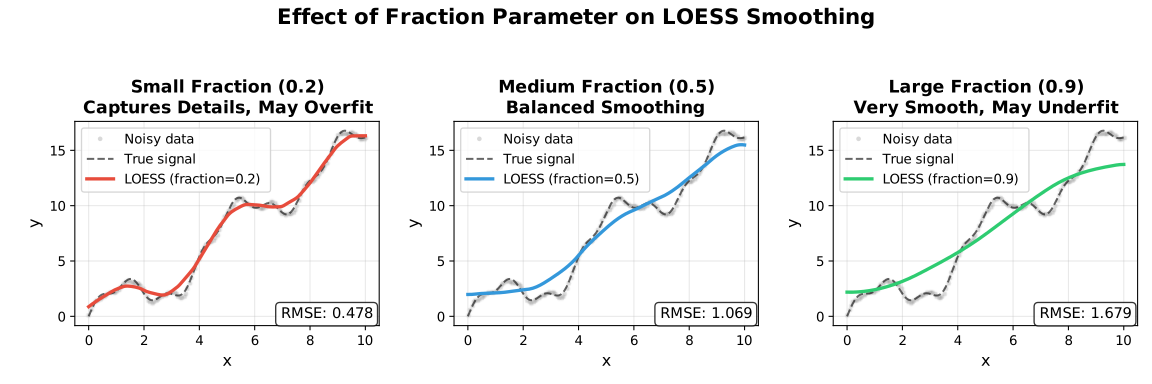
The proportion of data used for each local fit. Most important parameter.

Value Effect Use Case
0.1–0.3 Fine detail Rapidly changing signals
0.3–0.5 Balanced General purpose
0.5–0.7 Heavy smoothing Noisy data
0.7–1.0 Very smooth Trend extraction

Fraction Comparison

model <- Loess(fraction = 0.3)
result <- model$fit(x, y)
model = fl.Loess(fraction=0.3)
result = model.fit(x, y)
let model = Loess::new()
    .fraction(0.3)
    .build()?;
let result = model.fit(&x, &y)?;
model = Loess(; fraction=0.3)
result = fit(model, x, y)
const model = new Loess({ fraction: 0.3 });
const result = model.fit(x, y);
const model = new Loess({ fraction: 0.3 });
const result = model.fit(x, y);
fastloess::Loess model({ .fraction = 0.3 });
auto result = model.fit(x, y).value();

iterations

Number of robustness iterations for outlier resistance.

Value Effect Performance
0 No robustness Fastest
1–3 Moderate Recommended
4–6 Strong Contaminated data
7+ Very strong Heavy outliers
model <- Loess(iterations = 5)
result <- model$fit(x, y)
model = fl.Loess(iterations=5)
result = model.fit(x, y)
let model = Loess::new()
    .iterations(5)
    .build()?;
let result = model.fit(&x, &y)?;
model = Loess(; iterations=5)
result = fit(model, x, y)
const model = new Loess({ iterations: 5 });
const result = model.fit(x, y);
const model = new Loess({ iterations: 5 });
const result = model.fit(x, y);
fastloess::Loess model({ .iterations = 5 });
auto result = model.fit(x, y).value();

degree

Polynomial degree for the local regression fits.
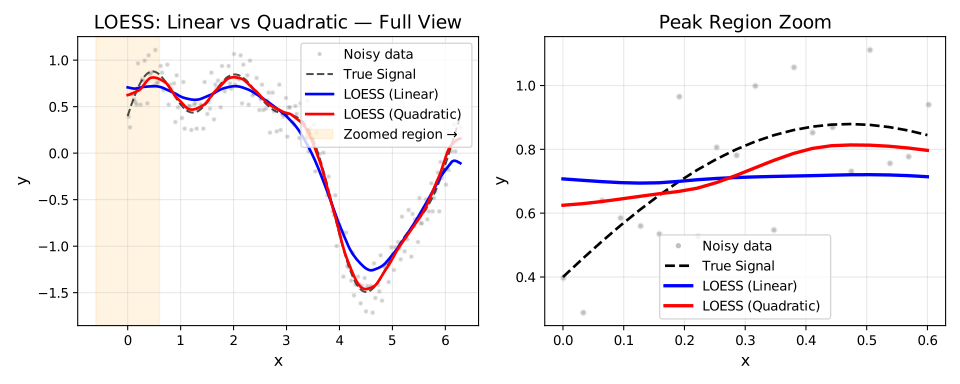
Degree Comparison

Degree Fit Type
0 Local constant
1 Local linear (Default)
2 Local quadratic
3 Local cubic
4 Local quartic

Higher degrees capture curvature but can overfit with small fractions. Degree 1 is appropriate for most use cases.

See Polynomial Degree for a detailed comparison.


surface_mode

Controls whether the local polynomial is evaluated at every query point or at a sparser grid of anchor vertices with Hermite cubic interpolation in between.

Mode Behavior Speed Accuracy
"interpolation" (default) Evaluate at vertices, interpolate between Faster Slight approximation
"direct" Evaluate at every query point Slower Full precision

See Polynomial Degree for a visual comparison.

model <- Loess(surface_mode = "direct")
result <- model$fit(x, y)
model = fl.Loess(surface_mode="direct")
result = model.fit(x, y)
let model = Loess::new()
    .surface_mode("direct")
    .build()?;
let result = model.fit(&x, &y)?;
model = Loess(; surface_mode="direct")
result = fit(model, x, y)
const model = new Loess({ surface_mode: "direct" });
const result = model.fit(x, y);
const model = new Loess({ surface_mode: "direct" });
const result = model.fit(x, y);
fastloess::Loess model({ .surface_mode = "direct" });
auto result = model.fit(x, y).value();

cell

Cell size for the interpolation grid. Controls the density of anchor vertices when surface_mode = "interpolation". Smaller values produce a finer grid, increasing accuracy at the cost of memory and computation.

  • Default: 0.2 (20% of x-range per dimension)
  • Range: (0, ∞) — values close to 0 approach "direct" accuracy
  • Adapter: All
cell Grid density Accuracy Speed
0.05 Very fine Highest Slowest
0.2 Moderate (default) High Fast
0.5 Coarse Lower Faster
model <- Loess(cell = 0.05)
result <- model$fit(x, y)
model = fl.Loess(cell=0.05)
result = model.fit(x, y)
let model = Loess::new().cell(0.05).build()?;
model = Loess(; cell=0.05)
result = fit(model, x, y)
const model = new Loess({ cell: 0.05 });
const result = model.fit(x, y);
const model = new Loess({ cell: 0.05 });
const result = model.fit(x, y);
fastloess::Loess model({ .cell = 0.05 });
auto result = model.fit(x, y).value();

interpolation_vertices

Explicitly set the number of anchor vertices for the interpolation grid, overriding the cell-based automatic count. Use when you need a precise vertex budget.

  • Default: auto (derived from cell and data range)
  • Adapter: All
model <- Loess(interpolation_vertices = 50L)
result <- model$fit(x, y)
model = fl.Loess(interpolation_vertices=50)
result = model.fit(x, y)
let model = Loess::new().interpolation_vertices(50).build()?;
model = Loess(; interpolation_vertices=50)
result = fit(model, x, y)
const model = new Loess({ interpolation_vertices: 50 });
const result = model.fit(x, y);
const model = new Loess({ interpolation_vertices: 50 });
const result = model.fit(x, y);
fastloess::Loess model({ .interpolation_vertices = 50 });
auto result = model.fit(x, y).value();

dimensions

Number of predictor variables. Enables multivariate LOESS over an n-dimensional input space.
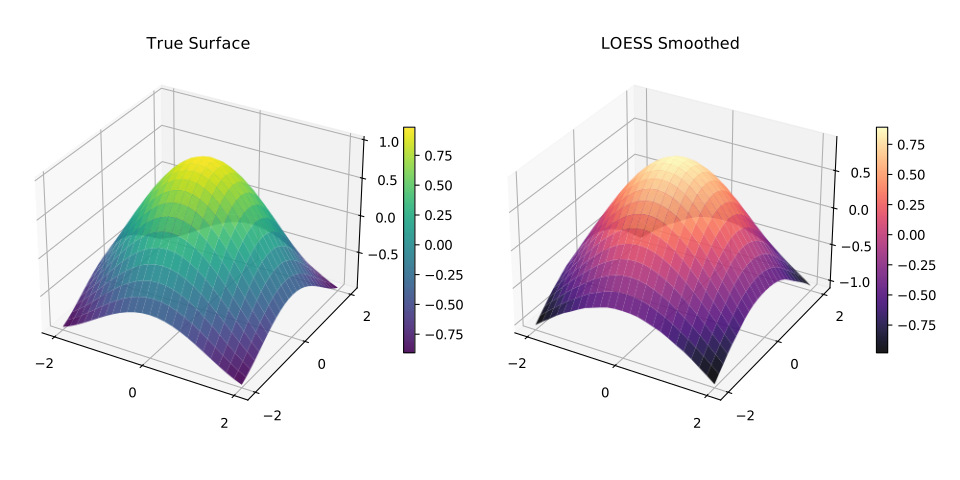
Multivariate LOESS

  • 1 (default): Standard 1D smoothing over a single predictor
  • 2: Spatial or bi-predictor surface smoothing
  • 3+: High-dimensional local regression

See Multivariate LOESS for detailed usage and distance metric options.


distance_metric / weighted_metric_weights

Distance metric for neighbourhood calculation. Only meaningful when dimensions > 1. The "weighted" metric lets you assign per-dimension importance via weighted_metric_weights.

Metric Description
"normalized" Each dimension scaled to unit range (default)
"euclidean" Raw Euclidean distance
"manhattan" City-block distance
"chebyshev" Maximum coordinate difference
"minkowski:p" Generalised \(L_p\) norm — e.g. "minkowski:3"
"weighted" Weighted Euclidean — set weighted_metric_weights to one weight per dimension
model <- Loess(
    dimensions = 2L,
    distance_metric = "weighted",
    weighted_metric_weights = c(2.0, 0.5)  # x1 twice as important
)
result <- model$fit(x2d, y)
model = fl.Loess(
    dimensions=2,
    distance_metric="weighted",
    weighted_metric_weights=[2.0, 0.5]
)
result = model.fit(x2d, y)
let model = Loess::new()
    .dimensions(2)
    .distance_metric("weighted")
    .weighted_metric_weights(vec![2.0, 0.5])
    .build()?;
let result = model.fit(&x2d, &y)?;
model = Loess(;
    dimensions=2,
    distance_metric="weighted",
    weighted_metric_weights=[2.0, 0.5]
)
result = fit(model, x2d, y)
const model = new Loess({
    dimensions: 2,
    distance_metric: "weighted",
    weighted_metric_weights: [2.0, 0.5]
});
const result = model.fit(x2d, y);
const model = new Loess({
    dimensions: 2,
    distance_metric: "weighted",
    weighted_metric_weights: [2.0, 0.5]
});
const result = model.fit(x2d, y);
fastloess::LoessOptions opts;
opts.dimensions = 2;
opts.distance_metric = "weighted";
opts.weighted_metric_weights = {2.0, 0.5};
fastloess::Loess model(opts);
auto result = model.fit(x2d, y).value();

weight_function

Distance weighting kernel for local fits.

Kernel Efficiency Smoothness
"tricube" 0.998 Very smooth
"epanechnikov" 1.000 Smooth
"gaussian" 0.961 Infinite
"biweight" 0.995 Very smooth
"cosine" 0.999 Smooth
"triangle" 0.989 Moderate
"uniform" 0.943 None

See Weight Functions for detailed comparison.

model <- Loess(weight_function = "epanechnikov")
result <- model$fit(x, y)
model = fl.Loess(weight_function="epanechnikov")
result = model.fit(x, y)
let model = Loess::new()
    .weight_function("epanechnikov")
    .build()?;
let result = model.fit(&x, &y)?;
model = Loess(; weight_function="epanechnikov")
result = fit(model, x, y)
const model = new Loess({ weight_function: "epanechnikov" });
const result = model.fit(x, y);
const model = new Loess({ weight_function: "epanechnikov" });
const result = model.fit(x, y);
fastloess::Loess model({ .weight_function = "epanechnikov" });
auto result = model.fit(x, y).value();

robustness_method

Method for downweighting outliers during iterative refinement.

Method Behavior Use Case
"bisquare" Smooth downweighting General-purpose
"huber" Linear beyond threshold Moderate outliers
"talwar" Hard threshold (0 or 1) Extreme contamination

See Robustness for detailed comparison.

model <- Loess(robustness_method = "talwar")
result <- model$fit(x, y)
model = fl.Loess(robustness_method="talwar")
result = model.fit(x, y)
let model = Loess::new()
    .robustness_method("talwar")
    .build()?;
let result = model.fit(&x, &y)?;
model = Loess(; robustness_method="talwar")
result = fit(model, x, y)
const model = new Loess({ robustness_method: "talwar" });
const result = model.fit(x, y);
const model = new Loess({ robustness_method: "talwar" });
const result = model.fit(x, y);
fastloess::Loess model({ .robustness_method = "talwar" });
auto result = model.fit(x, y).value();

boundary_policy

Edge handling strategy to reduce boundary bias. See Boundary Handling for a detailed comparison.
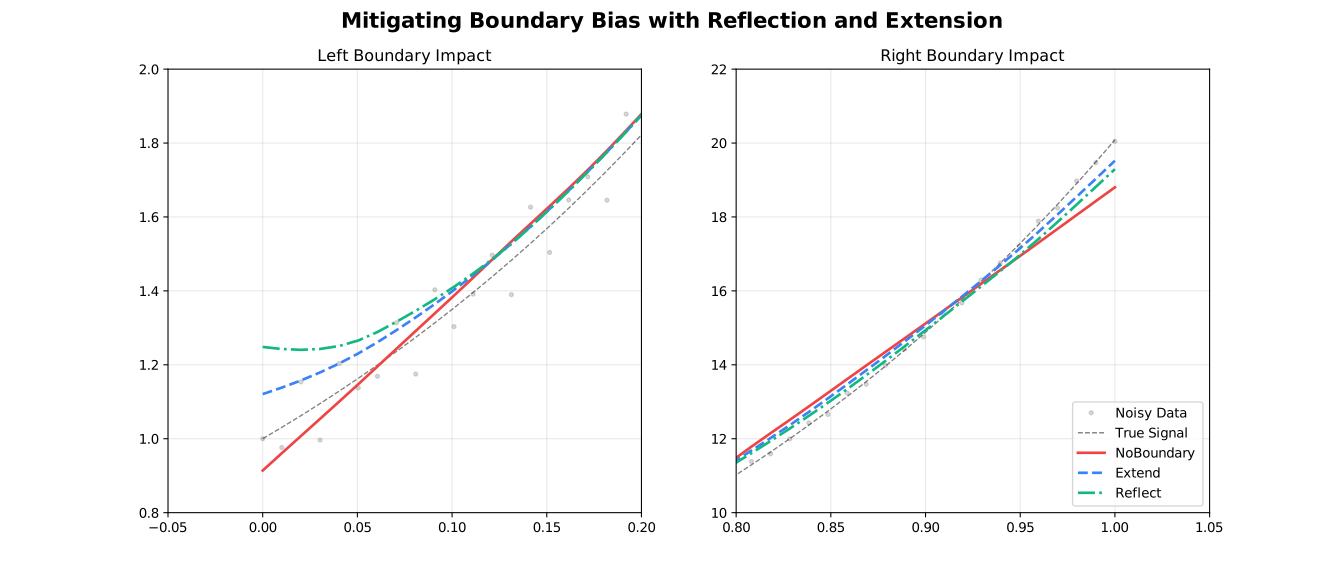
Boundary Policy

Policy Behavior Use Case
"extend" Pad with first/last values Most cases (default)
"reflect" Mirror data at boundaries Periodic/symmetric data
"zero" Pad with zeros Data approaches zero
"noboundary" No padding Original Cleveland behavior

For example:

model <- Loess(boundary_policy = "reflect")
result <- model$fit(x, y)
model = fl.Loess(boundary_policy="reflect")
result = model.fit(x, y)
let model = Loess::new()
    .boundary_policy("reflect")
    .build()?;
let result = model.fit(&x, &y)?;
model = Loess(; boundary_policy="reflect")
result = fit(model, x, y)
const model = new Loess({ boundary_policy: "reflect" });
const result = model.fit(x, y);
const model = new Loess({ boundary_policy: "reflect" });
const result = model.fit(x, y);
fastloess::Loess model({ .boundary_policy = "reflect" });
auto result = model.fit(x, y).value();

boundary_degree_fallback

When enabled, the polynomial degree is automatically reduced to the highest degree that can be stably estimated for points near the boundary (where the local neighbourhood is one-sided). Prevents numerical failures when degree ≥ 2 at the edges.

  • Default: false
  • Adapter: All

Tip

Enable this if you observe NaN values or instability at the edges of your data when using degree = "quadratic" or higher.

model <- Loess(degree = "quadratic", boundary_degree_fallback = TRUE)
result <- model$fit(x, y)
model = fl.Loess(degree="quadratic", boundary_degree_fallback=True)
result = model.fit(x, y)
let model = Loess::new()
    .degree("quadratic")
    .boundary_degree_fallback(true)
    .build()?;
let result = model.fit(&x, &y)?;
model = Loess(; degree="quadratic", boundary_degree_fallback=true)
result = fit(model, x, y)
const model = new Loess({ degree: "quadratic", boundary_degree_fallback: true });
const result = model.fit(x, y);
const model = new Loess({ degree: "quadratic", boundary_degree_fallback: true });
const result = model.fit(x, y);
fastloess::Loess model({ .degree = "quadratic", .boundary_degree_fallback = 1 });
auto result = model.fit(x, y).value();

scaling_method

Method for estimating residual scale during robustness iterations. See Scaling Methods for a detailed comparison.
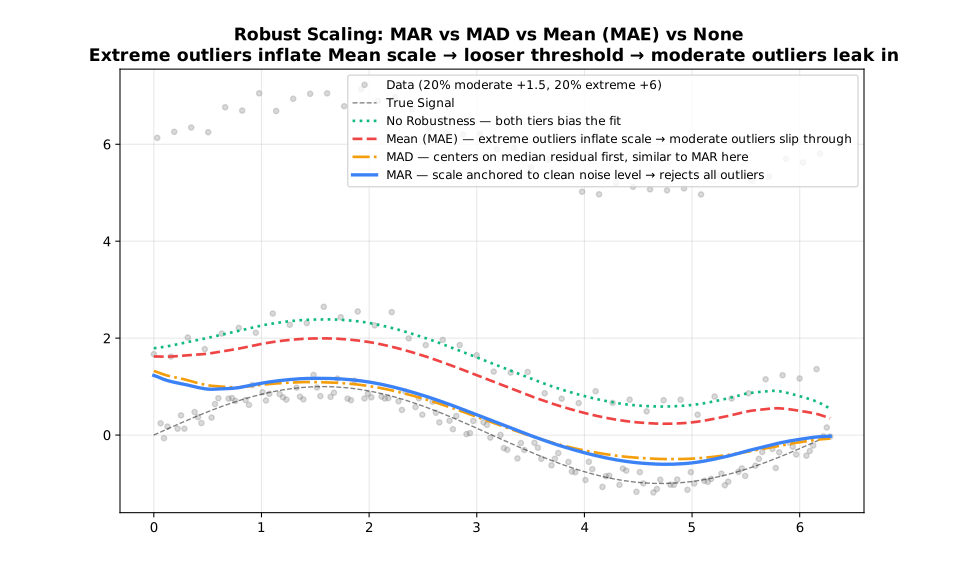
Scaling Methods

Method Description Robustness
"mad" Median Absolute Deviation Very robust
"mar" Median Absolute Residual Robust
"mean" Mean Absolute Residual Less robust

For example:

model <- Loess(scaling_method = "mad")
result <- model$fit(x, y)
model = fl.Loess(scaling_method="mad")
result = model.fit(x, y)
let model = Loess::new()
    .scaling_method("mad")
    .build()?;
let result = model.fit(&x, &y)?;
model = Loess(; scaling_method="mad")
result = fit(model, x, y)
const model = new Loess({ scaling_method: "mad" });
const result = model.fit(x, y);
fastloess::Loess model({ .scaling_method = "mad" });
auto result = model.fit(x, y).value();

zero_weight_fallback

Behavior when all neighborhood weights are zero.
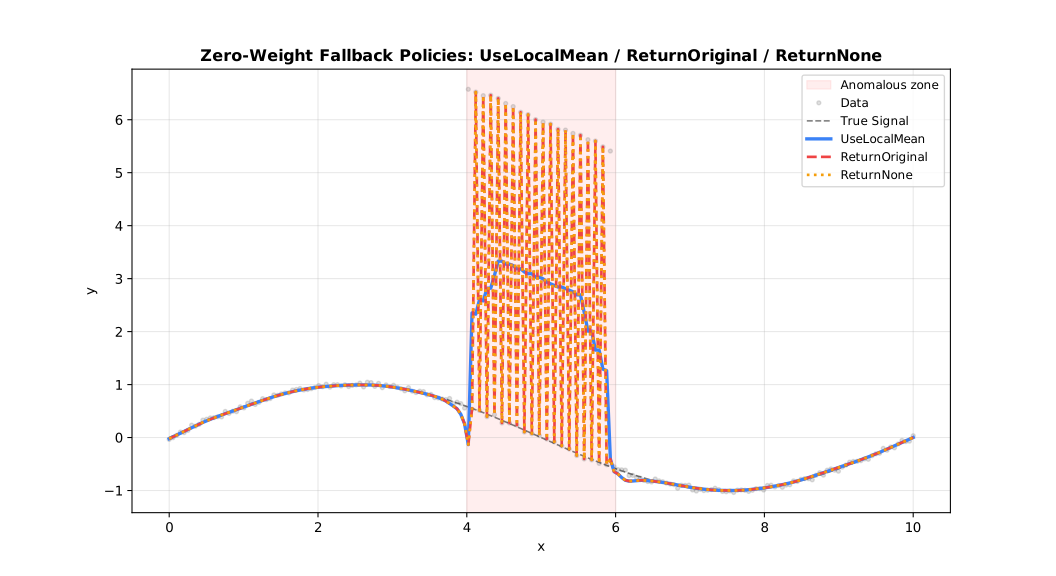
Zero-Weight Fallback Policies

Option Behavior
"use_local_mean" Use mean of neighborhood (default)
"return_original" Return original y value
"return_none" Return NaN

For example:

model <- Loess(zero_weight_fallback = "use_local_mean")
result <- model$fit(x, y)
model = fl.Loess(zero_weight_fallback="use_local_mean")
result = model.fit(x, y)
let model = Loess::new()
    .zero_weight_fallback("use_local_mean")
    .build()?;
let result = model.fit(&x, &y)?;
model = Loess(; zero_weight_fallback="use_local_mean")
result = fit(model, x, y)
const model = new Loess({ zero_weight_fallback: "use_local_mean" });
const result = model.fit(x, y);
const model = new Loess({ zero_weight_fallback: "use_local_mean" });
const result = model.fit(x, y);
fastloess::Loess model({ .zero_weight_fallback = "use_local_mean" });
auto result = model.fit(x, y).value();

auto_converge

Enable early stopping when robustness weights stabilize.

model <- Loess(iterations = 20, auto_converge = 1e-6)
result <- model$fit(x, y)
model = fl.Loess(iterations=20, auto_converge=1e-6)
result = model.fit(x, y)
let model = Loess::new()
    .iterations(20)           // Maximum
    .auto_converge(1e-6)      // Stop when change < 1e-6
    .build()?;
let result = model.fit(&x, &y)?;
model = Loess(; iterations=20, auto_converge=1e-6)
result = fit(model, x, y)
const model = new Loess({ iterations: 20, auto_converge: 1e-6 });
const result = model.fit(x, y);
const model = new Loess({ iterations: 20, auto_converge: 1e-6 });
const result = model.fit(x, y);
fastloess::Loess model({ .iterations = 20, .auto_converge = 1e-6 });
auto result = model.fit(x, y).value();

parallel

Enable multi-threaded parallel execution via Rayon. Substantially speeds up fitting on datasets with more than a few hundred points.

  • Default: true for Batch and Streaming; false for Online
  • Adapter: All

Note

OnlineLoess defaults to false because it fits one point at a time. Each update touches only the sliding window, so there is no inner loop large enough to benefit from parallelism — enabling it would add thread overhead with no gain.

Tip

Set to false for fully deterministic, reproducible output when debugging, or in environments where thread safety is required.

model <- Loess(parallel = FALSE)
result <- model$fit(x, y)
model = fl.Loess(parallel=False)
result = model.fit(x, y)
let model = Loess::new()
    .parallel(false)
    .build()?;
let result = model.fit(&x, &y)?;
model = Loess(; parallel=false)
result = fit(model, x, y)
const model = new Loess({ parallel: false });
const result = model.fit(x, y);
const model = new Loess({ parallel: false });
const result = model.fit(x, y);
fastloess::Loess model({ .parallel = false });
auto result = model.fit(x, y).value();

custom_weights

Per-observation case weights that scale each point's contribution to nearby local fits. Equivalent to the weights argument in R's stats::loess.

Formula: w_ij = custom_weights[j] × K(d_ij / h) × robustness_j

where K is the distance kernel and robustness_j is the robustness weight (if iterations > 0).

Value Effect
1.0 for all Equivalent to no weights (uniform)
0.0 Excludes the observation from all local fits
> 1.0 Increases the observation's influence
0 < v < 1.0 Reduces the observation's influence

Batch only

custom_weights is applied in Batch mode only. It is ignored in Streaming and Online modes.

Length must match y

The weights vector must have the same length as y. A mismatch returns an error.

# Downweight an outlier at index 5
weights <- rep(1, length(y))
weights[5] <- 0
model <- Loess()
result <- model$fit(x, y, custom_weights = weights)
import numpy as np
weights = np.ones(len(y))
weights[4] = 0  # Exclude 5th point
model = fl.Loess()
result = model.fit(x, y, custom_weights=weights)
let mut weights = vec![1.0f64; y.len()];
weights[4] = 0.0; // Exclude 5th point
let model = Loess::new()
    .custom_weights(weights)
    .build()?;
let result = model.fit(&x, &y)?;
weights = ones(length(y))
weights[5] = 0.0  # Exclude 5th point
model = Loess()
result = fit(model, x, y; custom_weights=weights)
const weights = new Array(y.length).fill(1);
weights[4] = 0; // Exclude 5th point
const model = new Loess({ custom_weights: weights });
const result = model.fit(x, y);
const weights = new Array(y.length).fill(1);
weights[4] = 0; // Exclude 5th point
const model = new Loess({ custom_weights: weights });
const result = model.fit(x, y);
std::vector<double> custom_weights(y.size(), 1.0);
custom_weights[4] = 0.0; // Exclude 5th point
fastloess::Loess model;
auto result = model.fit(x, y, custom_weights).value();

Output Options

return_residuals

Include residuals (y - smoothed) in the output.

model <- Loess(return_residuals = TRUE)
result <- model$fit(x, y)
print(result$residuals)
model = fl.Loess(return_residuals=True)
result = model.fit(x, y)
print(result.residuals)
let model = Loess::new()
    .return_residuals()
    .build()?;

let result = model.fit(&x, &y)?;
if let Some(residuals) = result.residuals {
    println!("Residuals: {:?}", residuals);
}
model = Loess(; return_residuals=true)
result = fit(model, x, y)
println(result.residuals)
const model = new Loess({ return_residuals: true });
const result = model.fit(x, y);
console.log(result.residuals);
const model = new Loess({ return_residuals: true });
const result = model.fit(x, y);
console.log(result.residuals);
fastloess::Loess model({ .return_residuals = true });
auto result = model.fit(x, y).value();
auto residuals = result.residuals();

return_diagnostics

Include fit quality metrics (Batch and Streaming only).

Metric Description
rmse Root Mean Square Error
mae Mean Absolute Error
r_squared R² coefficient
residual_sd Residual standard deviation
effective_df Effective degrees of freedom
aic Akaike Information Criterion
aicc Corrected AIC
model <- Loess(return_diagnostics = TRUE)
result <- model$fit(x, y)
cat(sprintf("R²: %.4f\n", result$diagnostics$r_squared))
model = fl.Loess(return_diagnostics=True)
result = model.fit(x, y)
print(f"R²: {result.diagnostics.r_squared:.4f}")
let model = Loess::new()
    .return_diagnostics()
    .build()?;

let result = model.fit(&x, &y)?;
if let Some(diag) = result.diagnostics {
    println!("R²: {:.4}", diag.r_squared);
    println!("RMSE: {:.4}", diag.rmse);
}
model = Loess(; return_diagnostics=true)
result = fit(model, x, y)
println("R²: ", result.diagnostics.r_squared)
const model = new Loess({ return_diagnostics: true });
const result = model.fit(x, y);
console.log("R²:", result.diagnostics.r_squared);
const model = new Loess({ return_diagnostics: true });
const result = model.fit(x, y);
console.log("R²:", result.diagnostics?.r_squared);
fastloess::Loess model({ .return_diagnostics = true });
auto result = model.fit(x, y).value();
auto diag = result.diagnostics();
std::cout << "R²: " << diag.r_squared() << std::endl;

return_robustness_weights

Include final robustness weights (useful for outlier detection).

model <- Loess(iterations = 3, return_robustness_weights = TRUE)
result <- model$fit(x, y)
outliers <- which(result$robustness_weights < 0.5)
model = fl.Loess(iterations=3, return_robustness_weights=True)
result = model.fit(x, y)
outliers = [i for i, w in enumerate(result.robustness_weights) if w < 0.5]
let model = Loess::new()
    .iterations(3)
    .return_robustness_weights()
    .build()?;

let result = model.fit(&x, &y)?;
// Points with weight < 0.5 are likely outliers
model = Loess(; iterations=3, return_robustness_weights=true)
result = fit(model, x, y)
# Points with result.robustness_weights < 0.5 are likely outliers
const model = new Loess({ iterations: 3, return_robustness_weights: true });
const result = model.fit(x, y);
// result.robustness_weights contains outlier weights
const model = new Loess({ iterations: 3, return_robustness_weights: true });
const result = model.fit(x, y);
// result.robustness_weights contains outlier weights
fastloess::Loess model({ .iterations = 3, .return_robustness_weights = true });
auto result = model.fit(x, y).value();
auto weights = result.robustness_weights();

confidence_intervals / prediction_intervals

Request uncertainty estimates (Batch only).

See Intervals for detailed usage.

model <- Loess(confidence_intervals = 0.95, prediction_intervals = 0.95)
result <- model$fit(x, y)
model = fl.Loess(confidence_intervals=0.95, prediction_intervals=0.95)
result = model.fit(x, y)
let model = Loess::new()
    .confidence_intervals(0.95)
    .prediction_intervals(0.95)
    .build()?;
let result = model.fit(&x, &y)?;
model = Loess(; confidence_intervals=0.95, prediction_intervals=0.95)
result = fit(model, x, y)
const model = new Loess({ confidence_intervals: 0.95, prediction_intervals: 0.95 });
const result = model.fit(x, y);
const model = new Loess({ confidence_intervals: 0.95, prediction_intervals: 0.95 });
const result = model.fit(x, y);
fastloess::Loess model({ .confidence_intervals = 0.95, .prediction_intervals = 0.95 });
auto result = model.fit(x, y).value();

CV Methods

cv_method

Selection strategy for automated parameter tuning.

Method Description Speed
"kfold" K-Fold Cross-Validation Fast
"loocv" Leave-One-Out Cross-Validation Slow
model <- Loess(cv_method = "kfold", cv_k = 5)
result <- model$fit(x, y)
model = fl.Loess(cv_method="kfold", cv_k=5)
result = model.fit(x, y)
let model = Loess::new()
    .cv_method("kfold")
    .cv_k(5)
    .cv_fractions(vec![0.1, 0.3, 0.5])
    .build()?;
let result = model.fit(&x, &y)?;
model = Loess(; cv_method="kfold", cv_k=5)
result = fit(model, x, y)
// Coming soon
// Coming soon
fastloess::Loess model({
    .cv_fractions = {0.1, 0.3, 0.5},
    .cv_method = "kfold",
    .cv_k = 5
});
auto result = model.fit(x, y).value();

Adapter Parameters

chunk_size

Points per chunk in Streaming mode.

result <- StreamingLoess(chunk_size = 10000)$process_chunk(x, y)
model = fl.StreamingLoess(chunk_size=10000)
model.process_chunk(x, y)
result = model.finalize()
let model = StreamingLoess::new()
    .chunk_size(10000)
    .build()?;
model = StreamingLoess(; chunk_size=10000)
process_chunk(model, x, y)
result = finalize(model)
const processor = new StreamingLoess({}, { chunk_size: 10000 });
fastloess::StreamingOptions opts;
opts.chunk_size = 10000;
fastloess::StreamingLoess stream(opts);
(void)stream.process_chunk(x, y);
auto result = stream.finalize().value();

overlap

Overlap between chunks in Streaming mode.

result <- StreamingLoess(overlap = 1000)$process_chunk(x, y)
model = fl.StreamingLoess(overlap=1000)
model.process_chunk(x, y)
result = model.finalize()
let model = StreamingLoess::new()
    .overlap(1000)
    .build()?;
model = StreamingLoess(; overlap=1000)
process_chunk(model, x, y)
result = finalize(model)
const processor = new StreamingLoess({}, { overlap: 1000 });
fastloess::StreamingOptions opts;
opts.overlap = 1000;
fastloess::StreamingLoess stream(opts);
(void)stream.process_chunk(x, y);
auto result = stream.finalize().value();

merge_strategy

Method for merging overlapping chunks. See Merge Strategies for a detailed comparison.

Strategy Description Robustness
"average" Average of overlapping chunks Fastest, least robust
"take_first" Left chunk only Fastest, least robust
"take_last" Right chunk only Fastest, least robust
"weighted_average" Weighted average of overlapping chunks Most robust

For example:

result <- StreamingLoess(merge_strategy = "weighted_average")$process_chunk(x, y)
model = fl.StreamingLoess(merge_strategy="weighted_average")
model.process_chunk(x, y)
result = model.finalize()
let model = StreamingLoess::new()
    .merge_strategy("weighted_average")
    .build()?;
model = StreamingLoess(; merge_strategy="weighted_average")
process_chunk(model, x, y)
result = finalize(model)
const processor = new StreamingLoess({}, { merge_strategy: "weighted_average" });
// merge_strategy is handled internally in C++
fastloess::StreamingLoess stream({});
(void)stream.process_chunk(x, y);
auto result = stream.finalize().value();

window_capacity

Maximum points held in memory for Online mode.

model <- OnlineLoess(window_capacity = 500)
result <- model$add_point(x[1], y[1])  # NULL until window fills
model = fl.OnlineLoess(window_capacity=500)
result = model.add_point(x[0], y[0])  # None until window fills
let model = OnlineLoess::new()
    .window_capacity(500)
    .build()?;
model = OnlineLoess(; window_capacity=500)
result = add_point(model, x[1], y[1])  # nothing until window fills
const processor = new OnlineLoess({}, { window_capacity: 500 });
fastloess::OnlineOptions opts;
opts.window_capacity = 500;
fastloess::OnlineLoess model(opts);
auto out = model.add_point(x[0], y[0]).value();
// out.has_value() == false until window fills

min_points

Minimum points required before Online filter starts producing outputs.

model <- OnlineLoess(min_points = 10)
result <- model$add_point(x[1], y[1])  # NULL until 10 points seen
model = fl.OnlineLoess(min_points=10)
result = model.add_point(x[0], y[0])  # None until 10 points seen
let model = OnlineLoess::new()
    .min_points(10)
    .build()?;
model = OnlineLoess(; min_points=10)
result = add_point(model, x[1], y[1])  # nothing until 10 points seen
const processor = new OnlineLoess({}, { min_points: 10 });
fastloess::OnlineOptions opts;
opts.min_points = 10;
fastloess::OnlineLoess model(opts);
auto out = model.add_point(x[0], y[0]).value();
// out.has_value() == false until min_points reached

update_mode

Optimization strategy for Online mode updates.

Mode Description Speed
"full" Re-smooth entire window Slow
"incremental" Update only affected fits Fast

For example:

model <- OnlineLoess(update_mode = "full")
result <- model$add_point(x[1], y[1])
model = fl.OnlineLoess(update_mode="full")
result = model.add_point(x[0], y[0])
let model = OnlineLoess::new()
    .update_mode("full")
    .build()?;
model = OnlineLoess(; update_mode="full")
result = add_point(model, x[1], y[1])
const processor = new OnlineLoess({}, { update_mode: "full" });
fastloess::OnlineOptions opts;
opts.update_mode = "full";
fastloess::OnlineLoess model(opts);
auto out = model.add_point(x[0], y[0]).value();